Theme, Widget & Icon changer
- 4.6
- Rating
- 10.00M
- Installs
- Free
- Price
 Analysis by App-foxy
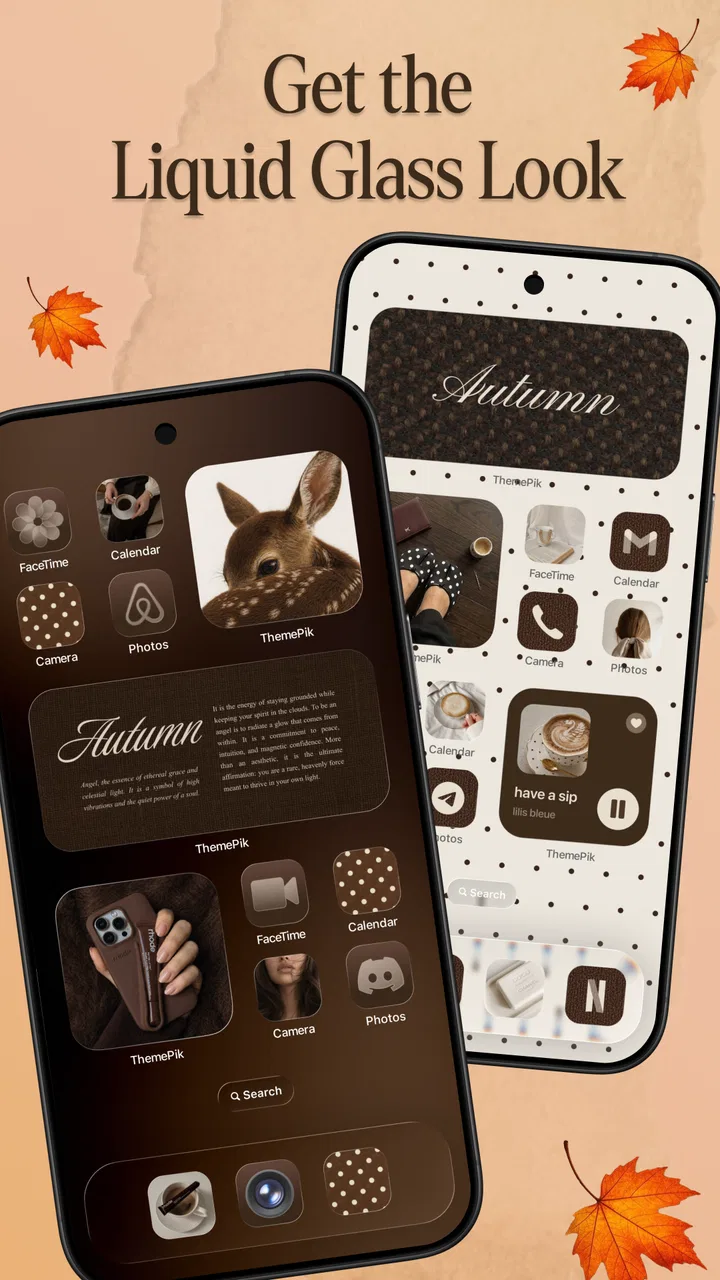
I like personalization apps that make a visible difference without asking me to rebuild my entire phone from scratch. Theme, Widget & Icon changer takes that approach: it brings home-screen themes, widgets, and app-icon changes into one place, so I can work on the look of my Android setup rather than collecting separate tools for each part. After spending time with it, my main impression is clear: this is a convenient visual refresh tool, not a complete replacement for Android’s launcher experience.
That distinction matters. If you want a quicker way to coordinate your wallpaper, icons, and widgets, this app is easy to understand and pleasant to experiment with. If you expect deep launcher controls, advanced automation, or total control over every system screen, you may find it limited. I would recommend it most to someone who wants a cleaner, more personal home screen with modest effort.
What the app does well in everyday use
Theme, Widget & Icon changer is a free personalization app from Eco Mobile Style. Its purpose is straightforward: help me create a more consistent home screen by combining visual themes, widgets, and app-icon styling. Rather than treating those elements as unrelated decorations, it presents them as parts of one design decision.
You May Also Like

 Blood Strike: 2.5 Anniversary
Blood Strike’s Loadouts Turn Every Drop Into a Tactical Gamble
A close look at Blood Strike’s custom loadouts: how fast access to signature weapons reshapes its battle royale rhythm, rewards preparation, and narrows the gap between fights.

 Pandora - Music & Podcasts
Pandora’s Music Is Easy to Start, but Harder to Recover
Pandora’s strength is its low-effort path from a seed to a station. Its weak spot is how much confidence it asks you to place in connection, setup, and quiet recovery.

 8 Ball Pool
 Is Built on Rivalries, Rematches, and Routine
A close look at the rivalries, rematches, shared routines, and unanswered safety questions that turn a quick pool match into a persistent mobile community.

 Samsung Music
’s Quiet Strength Is Playing What You Already Own
Its reach comes less from spectacle than from dependable access to a personal library. That simplicity is both the app’s strongest retention engine and its ceiling.

 AccuWeather: Weather Radar
AccuWeather Review: A Quick, Clear Forecast for Everyday Decisions
For everyday plans, the best forecast is the one you can understand quickly. AccuWeather makes rain timing, radar, and local conditions easy to act on, with a few trade-offs.

 Hill Climb Racing
Why Hill Climb Racing Still Turns Crashes Into One More Run
A tiny car, a bumpy hill and one more upgrade: Hill Climb Racing keeps resurfacing because its simple chaos makes every near-miss feel personal.
More From Our News Desk



That unified approach is the app’s strongest idea. When I change only a wallpaper, the result can feel unfinished because the existing icons and widgets still belong to a different visual style. When I adjust all three together, the phone feels more intentional. The app is useful precisely because it encourages that complete refresh instead of leaving me to remember every small detail myself.
The interface is aimed at ordinary phone users rather than customization experts. I do not need to understand launcher terminology before trying a design. I can browse the available visual direction, consider how it might look on my home screen, and decide whether it suits the way I use my phone. That lower barrier is important for anyone who finds traditional icon-pack and widget setup confusing.
I also appreciate that the app can be used for different levels of commitment. Someone may want a noticeable seasonal change, while another person may only want a more readable widget and a calmer set of icons. The app’s value is not limited to dramatic transformations. A small change can make a crowded home screen easier to live with, especially when the previous arrangement has accumulated shortcuts over time.
In my experience, the best results come from treating the home screen as a working space rather than a poster. A theme should look good, but it should also help me find the apps I use most. I would start by choosing the general mood, then place the most important widget where it can be read quickly, and only afterward decide which shortcuts deserve a prominent position. This order prevents the visual style from taking over the practical function of the phone.
Why the combined approach is more useful than changing one element
The usual alternative is to customize everything separately through Android settings, a launcher, an icon pack, and perhaps a widget app. That route can offer more control, but it also creates more decisions. I have to check whether the icon pack works with the launcher, whether the widget matches the wallpaper, and whether the layout remains usable after several changes.
Theme, Widget & Icon changer is more appealing when I want a coordinated result quickly. It reduces the amount of visual guesswork. A person who has never designed a home screen can begin with a complete direction instead of trying to match colors and shapes manually.
The trade-off is flexibility. Dedicated launchers usually provide finer control over grid size, gestures, folders, icon scaling, labels, and page behavior. A standalone widget app may offer deeper resizing or data choices. An icon-pack workflow can be more precise for people who already know exactly what they want. This app sits between those extremes: more convenient than assembling a design piece by piece, but less comprehensive than a full customization setup.
That middle position is not a flaw by itself. In fact, it is the reason I think the app makes sense for many people. Most users do not want a weekend project just to make their phone look less generic. They want a result that feels personal, and they want to return to normal phone use afterward.
Practical ways I would use it
A realistic everyday scenario would be a phone that has slowly become cluttered. I might have installed several apps, added shortcuts for work and travel, and left the original widget in place even though it no longer helps me. Instead of deleting everything and starting over, I could use a theme as a reset point, keep only the shortcuts I actually open, and choose a widget that gives the home screen a clear purpose.
For example, I would make the first page a quick-access page for communication and daily planning, while moving less frequent apps away from the main view. The visual theme would then support that arrangement instead of competing with it. This is a small but meaningful workflow: use the theme as a cleanup prompt, not merely as decoration.
Another useful case is preparing a phone for a different mood without buying anything. A softer design can make a personal device feel calmer, while a sharper, simpler arrangement may work better during a busy period. Because the app is free to install, it is easy to test the idea before deciding whether a complete visual change is worth keeping.
I would also use it when setting up a new Android phone for someone who does not enjoy customization. Rather than explaining several independent tools, I could show them one app that brings the main visual pieces together. That makes the first setup less intimidating, although I would still check that the resulting arrangement leaves their essential apps easy to reach.
Where the experience becomes less convincing
The biggest limitation is the gap between a polished visual concept and the practical details of long-term use. A home screen can look excellent during setup but become frustrating if icons are difficult to recognize, widgets consume too much space, or the arrangement does not fit the way I normally navigate. Personalization is successful only when the phone remains quick to use.
I would therefore avoid applying a complete theme immediately on a device that I depend on for work or urgent communication. I prefer to note the current location of essential apps first, then make changes gradually. This is especially useful when the visual style is very different from the standard Android appearance. A few minutes of preparation can prevent the common problem of admiring the new layout while searching for a familiar app.
There is also a learning curve around deciding how much customization is enough. The app makes experimentation tempting, but repeatedly changing the home screen can create its own kind of clutter. I found it more satisfying to compare a small number of directions and keep the one that improves everyday use, rather than constantly chasing a new look.
Another point to consider is the difference between a theme-focused app and a full launcher. If your priority is gesture control, detailed page management, highly specific icon placement, or advanced behavior, a dedicated launcher will probably be the better choice. Theme, Widget & Icon changer should not be judged as though it were trying to replace every launcher feature. Its strength is the visual starting point, not exhaustive control.
People who want a completely uniform interface across every part of Android may also need more than this app. The home screen is important, but it is only one layer of the phone’s appearance. System menus, notification areas, and individual apps may still follow their own designs. For me, that is acceptable because I mainly want the first screen to feel organized, but a perfectionist may prefer a broader customization system.
Cost, compatibility, and what to expect before installing
The app is free, which makes it easy to try without committing money at the beginning. It does include optional in-app purchases ranging from $0.49 to $99.99 per item, so I would pay attention to the purchase path before confirming anything. The wide range suggests that not every part of the experience is necessarily covered by the free installation, and users who want to explore without spending should make that decision consciously.
It is suitable for Everyone and requires Android 6.0 or later. That gives it broad compatibility with older Android phones as well as newer devices. Still, visual results can vary between phones because manufacturers often handle home screens and icon behavior differently. I would judge the app on the device where I intend to use it, rather than assuming that a design will look identical everywhere.
The current version is 1.1.1. I mention that because version details can matter when an app is used for home-screen customization: small changes in Android behavior or device software can affect how a visual setup feels. Keeping the app updated is sensible, but I would also avoid changing a carefully arranged home screen immediately before an important trip or workday.
The app has reached more than ten million installs and holds a 4.6 average from roughly one hundred fifty-two thousand ratings. Those figures indicate that the basic idea has attracted a substantial audience, but popularity does not remove the need to check whether its style matches my taste. Personalization is unusually subjective: a design that feels clean to one person may feel busy or distracting to another.
Who will get the most from it
I think this app is a strong fit for Android users who want a visible refresh without learning a complicated customization system. It is particularly suitable for someone who has never used icon packs, someone who wants widgets and icons to feel coordinated, or someone who is tired of the default home screen but does not want to replace the entire launcher.
It can also work well for families or friends who ask for help making their phones easier to understand. The combined approach gives me a simple way to discuss the home screen as one arrangement: what belongs on the first page, which widget is useful, and how the icons should support recognition. That is more approachable than presenting a long list of separate apps and settings.
I would be more cautious about recommending it to advanced Android hobbyists. If you already use a launcher with detailed layout controls and have a carefully built icon workflow, this app may feel like a shortcut where you want precision. It is also not the right choice for someone who dislikes changing familiar visual cues. In that case, a small manual cleanup may be better than applying a new theme.
Users who care most about battery efficiency, minimal background activity, or a completely distraction-free setup should also think carefully before adding another personalization layer. I would not install it merely because the phone feels boring. I would install it when I have a specific visual or organizational problem that a coordinated home-screen change can solve.
My most useful tip is to take a screenshot of the current home screen before experimenting. That gives me a reference for restoring the arrangement if the new design is attractive but less practical. I would also keep the first page focused on daily actions and place decorative elements on a secondary page. This preserves the benefit of the theme without allowing appearance to slow me down.
My verdict on Theme, Widget & Icon changer
After using it as a personalization tool rather than expecting a complete launcher replacement, I find Theme, Widget & Icon changer easy to recommend to the right person. Eco Mobile Style has focused the experience on a common frustration: Android home screens often look pieced together because wallpapers, widgets, and icons come from different choices. Bringing those elements into one visual workflow makes a refresh feel less technical.
Its weaknesses are equally clear. It does not automatically solve layout decisions, and a coordinated theme can still be inconvenient if I ignore how I actually use my phone. People seeking deep launcher control may be happier with a dedicated alternative, while users who prefer a plain, stable setup may not gain enough to justify changing anything.
For me, the app works best as a guided reset. I can use it to break out of a stale arrangement, remove visual noise, and create a home screen that feels more deliberate. The free entry point makes trying that process straightforward, provided I stay aware of optional purchases and keep my expectations realistic.
My recommendation is simple: install it if you want a coordinated visual makeover with less effort than a multi-app customization project. Skip it if your priority is advanced launcher engineering or absolute system-wide consistency. For everyday Android users who want their first screen to feel more like their own, this is a useful and approachable choice.
FAQs for Theme, Widget & Icon changer
01What is Theme, Widget & Icon Changer, and how does it work?
Theme, Widget & Icon Changer is an app that allows users to customize their smartphone's appearance by changing themes, widgets, and app icons. It offers a variety of styles and designs for personalization, making it easy for users to refresh their device's look without needing technical expertise.
02Is Theme, Widget & Icon Changer compatible with all devices?
The app is designed to work with most Android and iOS devices, but compatibility can vary. It's important to check the app requirements in the respective app store to ensure it supports your device's operating system version before downloading.
03Are there any costs associated with using Theme, Widget & Icon Changer?
While the app offers a selection of free themes and icons, it also includes premium content that requires in-app purchases. Users can access a wider variety of high-quality designs by subscribing or buying specific items, allowing for more extensive customization.
04How user-friendly is the customization process in Theme, Widget & Icon Changer?
The app is designed with a user-friendly interface, making it simple for users to navigate through customization options. Tutorials and guides are available to help users apply new themes, widgets, and icons effortlessly, even for those who aren't tech-savvy.
05Will using Theme, Widget & Icon Changer affect my device's performance?
The app is optimized to ensure minimal impact on device performance. However, extensive use of graphic-intensive themes or numerous widgets may slightly affect battery life and speed. It's advisable to monitor your device's performance after customization and adjust settings accordingly.
Pros
- Highly customizable home screen options.
- User-friendly interface for easy navigation.
- Regular updates with new themes.
- Compatible with most Android and iOS devices.
- Enhances phone aesthetics significantly.
Cons
- Some features may require in-app purchases.
- Occasional ads can interrupt usage.
- Limited free theme options available.
- May slightly slow down older devices.
- Requires permissions that some users may find intrusive.

Theme, Widget & Icon changer
Gallery